A Chrome extension from Jen Built It
Print any recipe as one engineered grid card
I read 50+ books a year, but recipe instructions won't stay in my head. I'd reread the same step over and over at the stove, and it drove me up a wall. Then my sister showed me this grid format and I fell in love: every ingredient lined up with its step, the whole recipe in one view. I had to have it, so I built it. Now any recipe can print like this.
3 free prints a month. No account, no email.
How it works
Three clicks between a recipe page and your binder
No copy-paste, no reformatting, no account. The extension only wakes up when you click it.
1. Open any recipe page
Works on the big recipe sites and on independent food blogs, anywhere the recipe is published as standard recipe data.
2. Click the card button
It reads the ingredients and steps, then builds the grid: every ingredient lined up with the step that uses it.
3. Print it
One card, sized to the page. Wide recipes flip to landscape on their own so nothing gets cut off.
The look
You'll love this format or you'll hate it
This is the engineered grid, the format where ingredients merge into steps like a flowchart. I cook from these every week. Before you install anything, you should know exactly what you're getting:
- It doesn't work everywhere. Some sites don't publish readable recipe data. You'll get a friendly heads-up instead of a card, and it costs you nothing.
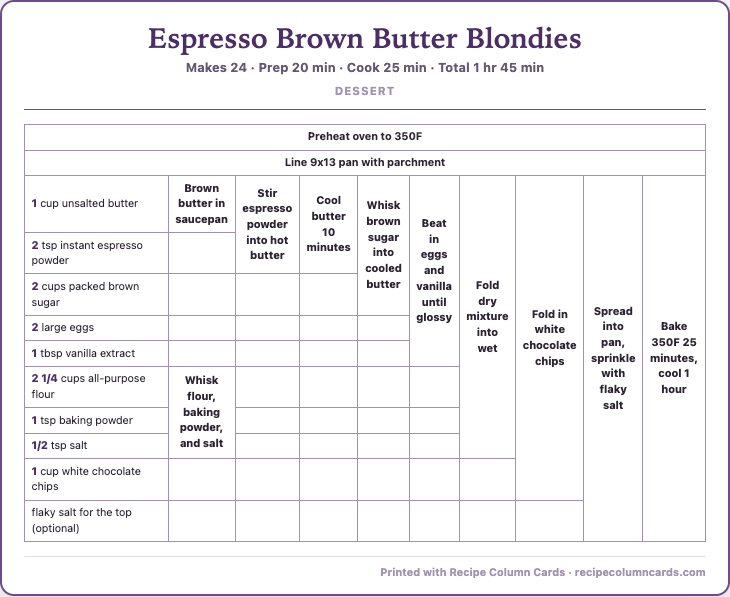
- Big recipes make big grids. A 10-step blondie recipe builds 9 step columns and prints landscape, like the one on the right. That IS the format doing its job.
- It won't always look like a dainty index card. If you want a cute two-column printable, plenty of tools do that. This one is for people whose brains read recipes as flowcharts.
Pricing
Free to try, cheap to keep
Start free with no account. Go Pro when you're printing more than a few cards a month.
Free
$0
forever
- 3 grid card prints a month
- No account, no email
- Small footer line on the card
Pro
$19 / year
- Up to 30 new recipes a day. Reprints never count.
- No footer line on prints
- License key by email, activate in one paste
Renews automatically until you cancel: $19 every year, or $2.99 every month on the monthly plan. Cancel anytime at recipecolumncards.com/manage. Refund and cancellation terms.
FAQ
Questions I actually get
Which sites does it work on?
Any page that publishes standard recipe data (schema.org Recipe), Many recipe sites and food blogs do. On pages that don't, you'll see a friendly "couldn't find a recipe" and no print gets used up.
What is an engineered grid card?
A table where ingredients run down the left column and steps merge across to the right, so you can see which ingredients go into which step at a glance. The format has been around cooking forums for decades. It reads like a flowchart for the recipe.
Does my recipe data leave my computer?
The ingredients and steps of the recipe you're printing are sent to my card builder, which uses AI to map ingredients to steps, then the card comes back. Nothing else from the page is read, and there's no account or tracking in the extension.
Why did the same recipe print a slightly different card twice?
The ingredient-to-step mapping is AI-built, and it occasionally groups things differently between builds. Cards are saved after the first build, so reprints match.
Can I cancel Pro whenever?
Yes. Go to recipecolumncards.com/manage, enter your license key, and cancel in Stripe's billing portal in one click, no emails, no phone calls. Pro runs through the period you paid for, then you drop back to the free 3 prints a month. Your printed cards are paper, they're yours forever.
Does this strip ads from the sites I print from?
No. The page stays exactly as the creator published it, ads and all. This only formats what you print for your own kitchen. I ran a recipe blog for years, so this one is personal.